

Every Customer, Every Stop, and Who Still Owes You. One Screen.
Routes, driver notes, monthly billing, and a who-owes list that keeps itself current. Built to run a family garbage service here in North Dakota. No monthly fee.
The Office Work, Handled
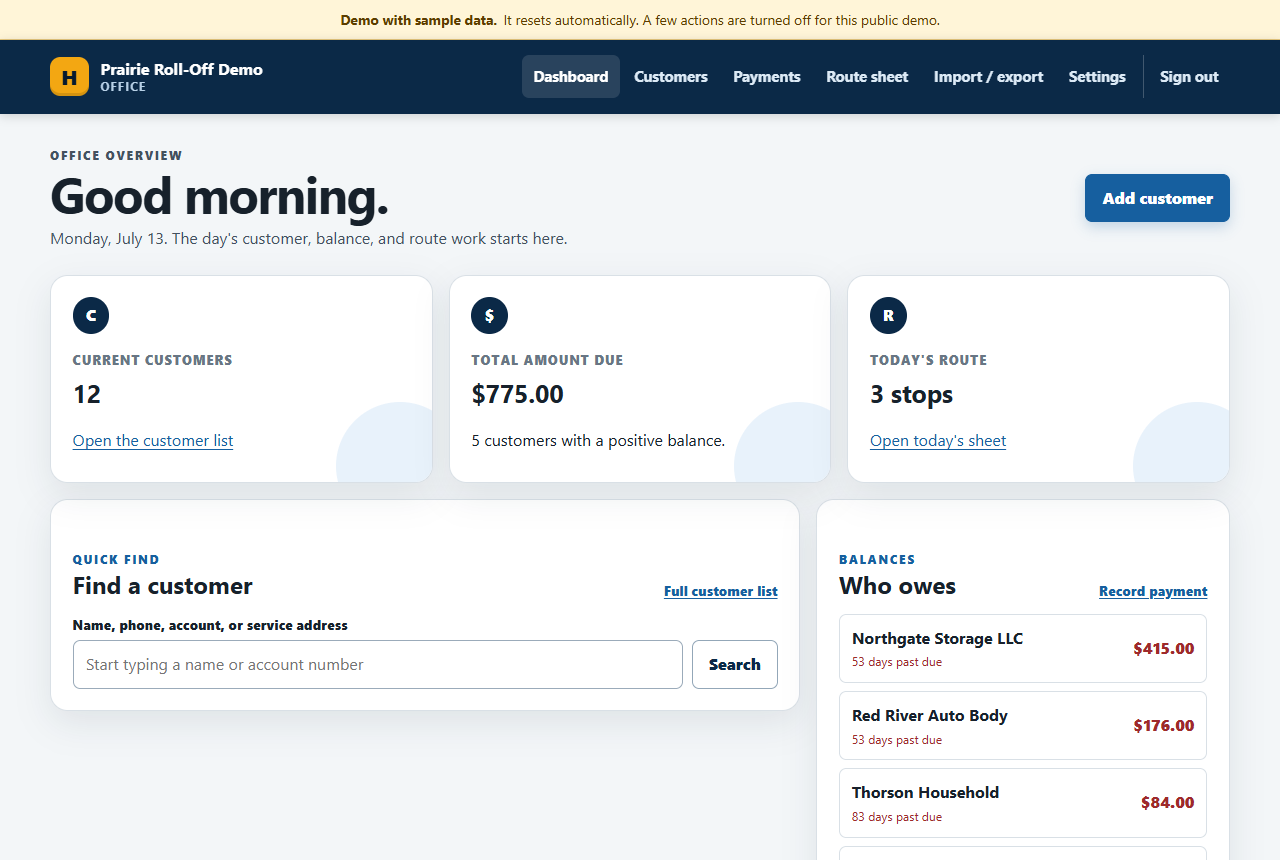
Open it in the morning and the day is already laid out: who's on today's route, who owes money, and who called about a missed pickup.
The who-owes list runs itself
Every customer's balance comes straight from the ledger, and the dashboard sorts the unpaid ones by how many days past due they are. No spreadsheet, no adding machine, no "I think they paid at the fair."
Find anyone in seconds by name, phone, account number, or service address. Their record holds everything: locations, container sizes and rates, vacation holds, and the full payment history with a running balance.
Built-in owner tools
- Who-owes list with day-based aging, straight off the dashboard
- Printable driver sheets for any route day
- Printable customer statements, generated for the whole route in one run
- Online card payments that post themselves to the right customer
- Customer, location, and payment CSV exports for taxes
- One-click backup that verifies itself before download
- Spreadsheet import to get your book of customers in fast
Routes Your Driver Can Actually Follow
Route days with ordered stops, the notes that matter at the curb, and a map with numbered pins.
Printable Driver Sheets
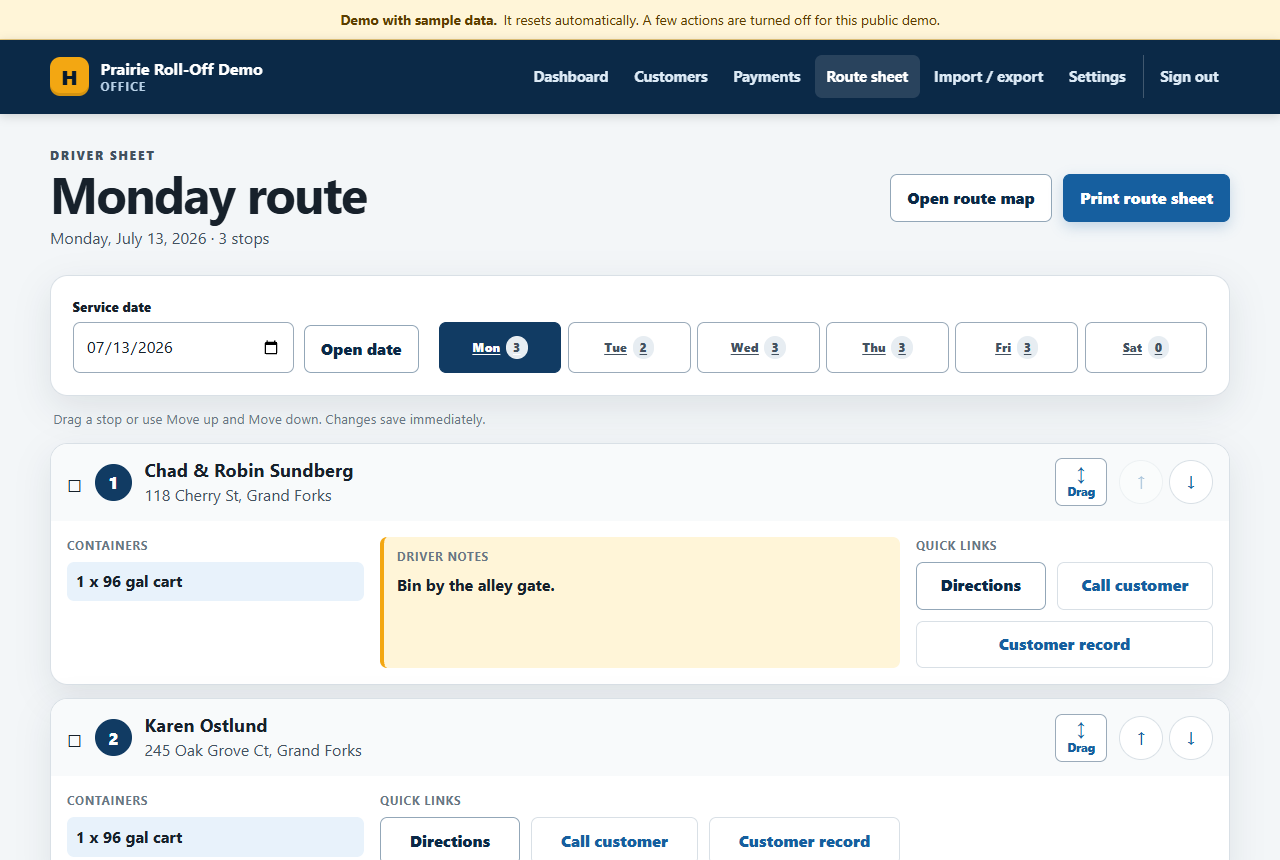
Each stop carries its containers and the note your driver actually needs: "bin by the alley gate," "gate code on file," "dog on site." Print it clean, or use the tap-to-call and directions links from a phone.
A Route Map with Numbered Pins
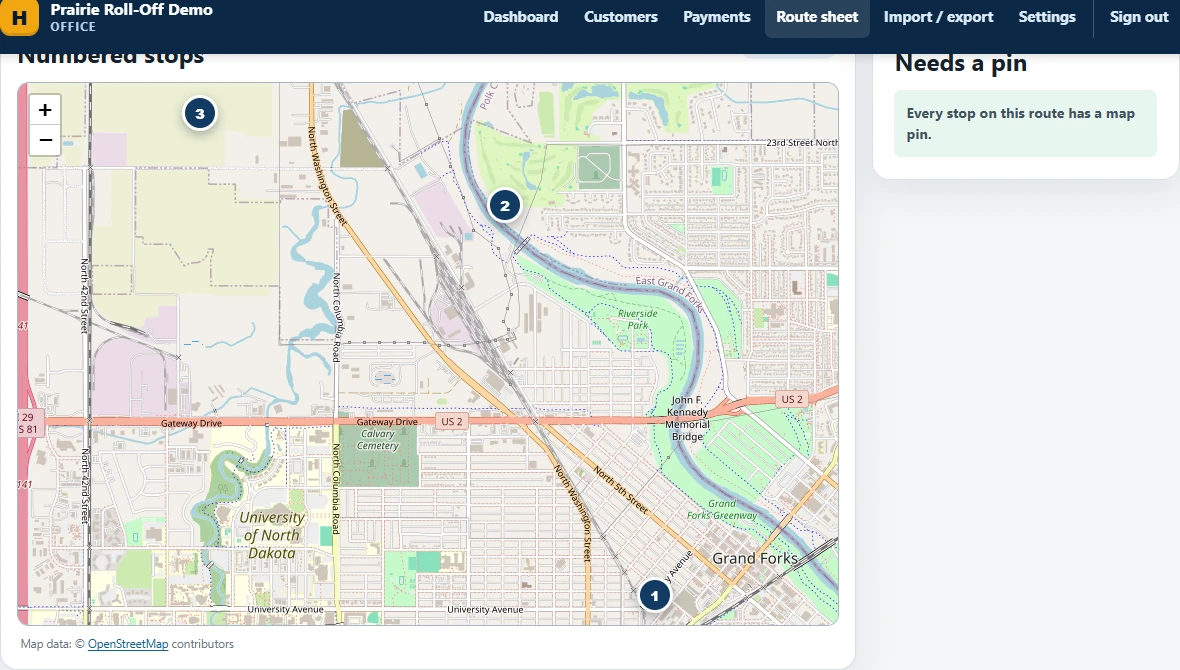
See the day's stops in order on a real map. Reorder a route by dragging stops and it saves immediately. The maps are bundled with the software, not loaded from some tracking CDN.
From Carts to Roll-Offs
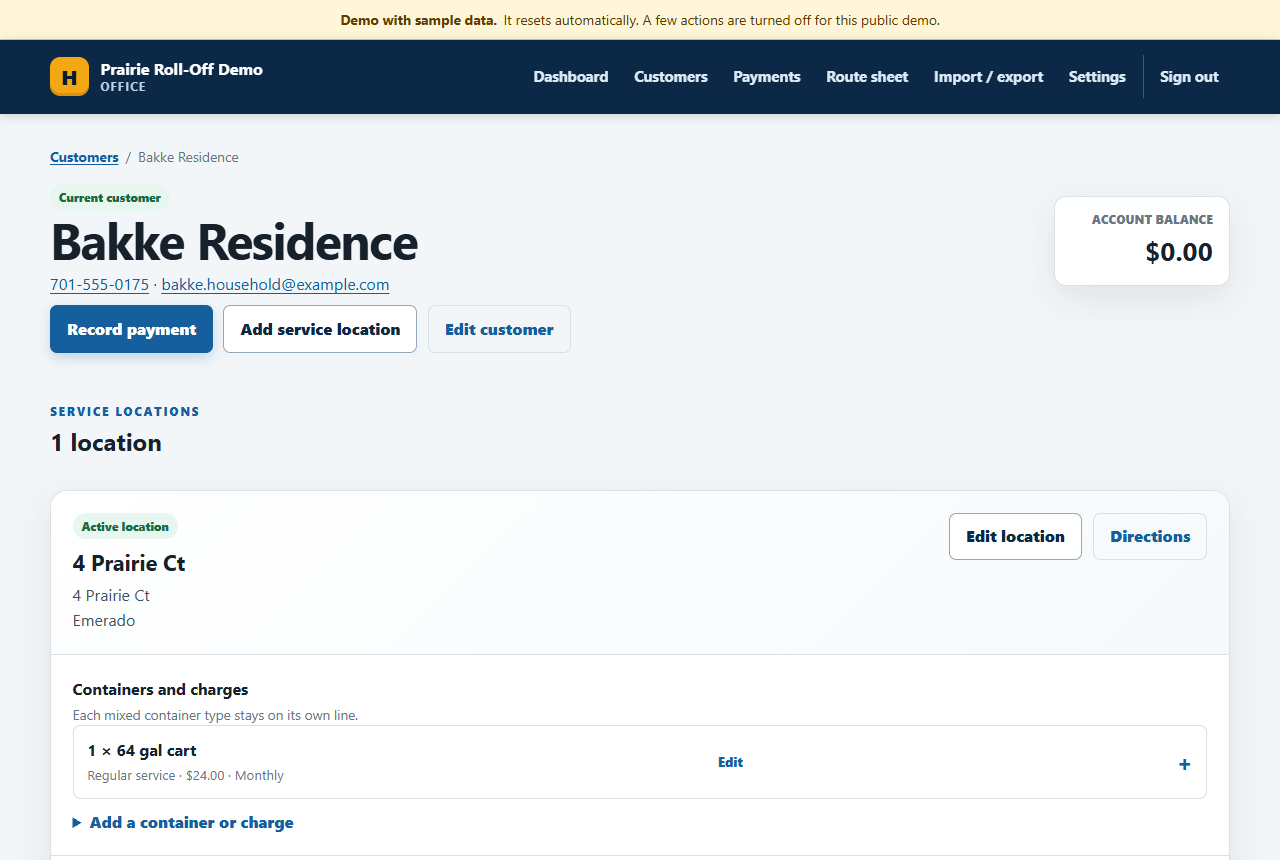
Service lines handle a 64-gallon cart the same as a 40-yard roll-off: quantity, size, rate, billed monthly or quarterly. Vacation holds skip the stop and the bill without losing the customer.
Billing That Can't Lose a Payment
The money lives in an append-only ledger. Entries can't be edited or deleted, ever, so the books always add up.
Monthly billing in one sitting
When it's time to bill, HaulerHQ shows you a preview of every charge it's about to post: who, what service, what amount. You look it over and confirm, and it posts exactly what you previewed. Quarterly customers get picked up in their months automatically.
Cash at the shop and checks in the mail take seconds to record. Card payments made on your public website come in through Stripe and post themselves to the right customer's ledger, so the office isn't re-keying a payment that already cleared.
Fat-finger a payment? The books survive.
Nothing in the ledger can be edited or deleted. The software's own database enforces it. A mistake gets fixed with a reversal entry that shows what happened and why, the same way a real accountant corrects a book. Every balance stays explainable forever.
The same protection stops the sneaky stuff: a double-clicked submit can't record the same payment twice.
Raising a rate works the same honest way: the change opens a new dated period instead of writing over the old line, so a bill from last spring still shows last spring's price.
Statements You Can Hand a Customer
Real per-customer statements, run for the whole route at once, that never change after you print them.
Bill the whole route in one run
Run a billing batch and HaulerHQ shows you the totals first, how many statements and the closing balance across all of them, before you commit a single one. Run it again later and the statements you already made are left exactly as they were, not made over again, so nobody gets billed twice.
Statements that can't drift
You pick the end date; the start date comes from wherever the last statement left off, so the periods never overlap and never leave a gap. Once a statement is made it's frozen: print it, hand out a copy, and the software logs that a copy went out without ever changing the statement itself.
What You Own When You Buy It
Self-hosted software, not a subscription. No monthly software fee, and no company sitting between you and your customer list.
No monthly software fee
You pay once for setup. The software is yours after that. It runs on any cheap PHP host, the kind that costs about $5 a month, or on my hosting if you'd rather not deal with it.
Your data is one file
Everything lives in a single database file on your own hosting. The backup button checks the file is healthy, then hands it to you. One click, one file, done. CSV exports any time you want them.
A real website included
The package includes a public website like the one I built for the hauler this software came from: service pages built for search, a request-service form, and online bill pay if you want it.
There's a pile of work under the hood you'll never look at: the ledger is protected at the database level, the CSVs open clean in Excel without letting a customer name execute a formula, the installer locks itself after setup, and logins are rate-limited and audited. The whole thing ships with over a dozen automated test suites that run before anything changes. It's new software, and I won't pretend otherwise. But it was built careful, for a real hauler, and reviewed harder than most things twice its size.
Kick the Tires Yourself
The demo is a fictional hauler loaded with fake customers. Log in with one click, poke around, change things. It resets itself every few hours.
The demo login is office / demo, and there's a one-click "Enter the demo" button on the login page. Everything in it is fictional, and the sensitive buttons are switched off for the public copy: settings, imports, backups.
Open the DemoWorth trying in there
- Open Monday's route sheet and hit Print to see the driver copy
- Drag a stop to reorder a route, then check the map
- Record a payment on someone in the who-owes list and watch it clear
- Export the payments CSV and open it in Excel
What It Costs
One-time setup, priced to your operation. No monthly software fee, ever.
What setup includes
- I load your customers from whatever you have: a spreadsheet, a notebook, the shoebox
- Your routes and days set up, stops in driving order
- Rates and billing periods entered so your first billing run is a button press
- Hosting stood up, on your host or mine
- A walkthrough so the office runs it comfortably on day one
Ongoing costs, honestly
Hosting is the only recurring cost. Bring your own $5-a-month host, or I'll host and maintain it at my normal hosting rate and be the one responsible when something needs attention.
Every operation is different, so I quote setup after a short conversation about yours.
Get a QuoteBuilt for a Real Hauler
This software wasn't built by a startup guessing what garbage companies need. It was built for Svoboda Sanitation Service, a family trash operation in Johnstown, ND, while I was building their website. Their routes lived in someone's head. Their billing lived on paper. Every feature in HaulerHQ exists because their office needed it: the driver notes because the new guy doesn't know which gate the dog is behind, the holds because customers leave for the winter, the reversal-only ledger because money mistakes should be corrected on the record, not erased.
I'm Ben Huffman. I run Dirt River Design, and I built this while building Svoboda's website. I cleaned it up, put a public demo on it, and made it something I can set up for your operation too. More about me here.
Questions Haulers Actually Ask
Do I need to be technical to run this?
No. If the office can use a web browser, it can run HaulerHQ. Look up a customer, record a payment, print the route sheet. I handle the technical setup: hosting, domain, data import, routes. That's what you're paying me for.
What do I need to host it?
Any basic PHP web host works, including the $5-a-month shared plans from the big providers. The database is a single file that ships with the software, so there's nothing extra to install or babysit. If you'd rather not deal with hosting at all, I'll host it for you at my normal hosting rate.
Can you load my existing customers?
Yes. There's a spreadsheet import with a friendly template: it maps your columns, shows every problem row with its line number, and stages the whole thing for one confirmed commit. It carries over each customer's opening balance too. You pick a cutover date, that starting balance posts as one ledger entry per customer in the same reviewed commit, and a negative number comes in as a starting credit. Nothing posts until you've looked it over.
Will it handle roll-offs and carts in the same book?
Yes. A service line is a quantity, a size, a rate, and a billing period: a 64-gallon cart every month or a 40-yard roll-off billed quarterly are the same thing to the software. Mixed customers with several containers at several locations are normal, not a special case.
Can my customers pay their bill online?
Yes, and the office never re-keys a card. Your customer pays by card on your public website, Stripe sends HaulerHQ a signed event for that payment, and HaulerHQ matches it to the right account on its own: by the account number on the payment, a saved link between that customer and their Stripe record, or a single unambiguous email match. When it's sure, the payment posts to that customer's ledger by itself. When it isn't sure, say two people share an email or more than one match is possible, it parks the payment in a review queue for someone to sort out by hand. It never guesses whose money it is. Refunds and disputes still get handled by hand in Stripe; the software doesn't try to reverse those for you.
What happens when someone enters a payment wrong?
The ledger is append-only and the database itself enforces it: no edits, no deletes, ever. A mistake gets a reversal entry that says what happened, and the correct entry goes in next to it. Your balances always add up, and you can always see how they got there.
Is my customer list locked into your system?
No. The database is one file sitting on your own hosting, and the software exports customers, locations, and the full ledger as CSVs any time. If you ever walk away, you keep everything and it all opens in Excel.
Can I see it working before I spend anything?
That's what the live demo is for. A fictional hauler, fake customers, one-click login. Poke at it as long as you want. Then get ahold of me and we'll talk about your routes.